|
|||
|
Web Workshop: Homework |
|
|
|
|||
 |

Unit One: Choose Sites Homework for unit one
Explore the Internet to find inspiration for your site.
Read Lesson One - Inspirational Sites and Planning Sites.
Unit Two: Who, why, what
Read Unit 2 then - These answers will help you design a website with a purpose.
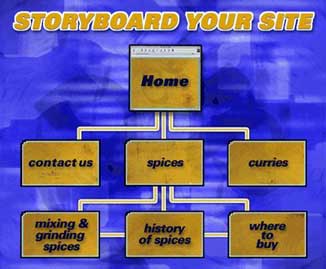
Read this unit's Lessons to plan your site. Websites and Planning. Unit Three: Navigation Website navigation. It's important to have a clear idea of your site before you build it.
This week's assignment is to create a flow chart for your website. Use this example as you map your flow chart.
Read this unit's Lesson to plan your site's navigation. Navigation Tips and Plan your Flow Chart.
Unit Four: Intro to HTML and WYSIWIG Editors
HTML and WYSIWIG Editors.
This week's assignment is to make a page with a Wysiwig program and view the source code. You can learn by examining the HTML created by the WYSIWIG. Also try to create the same page with the EZ Editor. Do not change any code - see how the editors are limited.
Read this unit's Lesson, Introduction to HTML and Intro to Editors.
Week Five: HTML: Make a Page
This week's assignment is to make,save and view your first page in HTML.
Read this week's Unit's Lesson, Introduction to HTML and HTML Lesson One and BamBam Sez. Complete the HTML Lesson One, use the others as rescources.
Unit Six: Add color Your assignment this week is to experiment with color. Change the background color, text color, and link color on your website.
Read Color guide, About Color in Extra Info, and Lesson 2.
Unit Seven: Links
Link to another page with in your site and create an absolute
link to an outside website.
Read this week's Web Workshop, HTML:
Links and Lesson 3.
Unit Eight: Crunch Graphics
Your assignment this week is to experiment with crunching graphics for
the Web. Reduce the file size of your graphics to find the best quality
for the Web.
Read this introduction for crunching
Web graphics.
Check your graphics for size and speed.
Quiz! Be ready.
Unit Nine: Add Images
Last unit you learned to crunch graphics.
This unit take your Web ready images and put those tags to work. Your
assignment is to add some extra images to your site. Use the Alt tag and
link from an image.
Learn how to add images to your site.
Quiz! Be Ready
Unit Ten: Domain name registration
This week research your options for a web host. Then go ahead and choose
the web host that fits your needs.
Two good resources are:
Read Getting Started: Domain Name Registration
and Hosting
Quiz! Be Ready.
Unit Eleven: FTP
This assignment this week is to troubleshoot
your site. Make sure all the links work and that all of the graphics display
correctly.
If you FTP your site - explain why you chose a certain FTP
Unit Twelve: Tables
Have a look at other tables on the web, view the source code to see
how they created their tables. Then make a table.
Read Table Guide and Do the Lessons
on Tables.
Unit Thirteen: Sound
The homework this unit is to review the Sound to your site. Use a link
to a sound you enjoy or embed a sound on your site.
Before you begin, read Sound
Planning.
For more on sounds, read Web Workshop:
Sound.
Also read Music and Audio
Sounds.
Unit Fourteen: Introduction to Flash
Your assignment this unit is to Try
Flash. Take the Flash units
and experiment with the program to learn basic animation.
For introduction information on Flash basics, read:
Flash.
Unit Fifteen: Create Rollovers
Your assignment this unit is to create a rollover using JavaScript and
Flash.
For more information on rollovers, read these articles:
Unit Sixteen: Analyze Website Traffic
Your assignment this unit is to create analyze your website traffic
using a counter.
For more information on traffic analysis, read this Web Workshop articles:
|
|
| Home | HTML Menu | Extra Information | HTML Hub | |