| BreBru's Art Room | |
 BreBru.com BreBru.comExtra Info Music Room ArtRoom |
|
page two
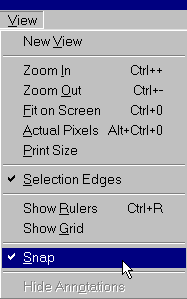
oom In, Zoom Out, Fit on Screen, Actual Pixels, and Print Size commands all affect magnification and should be self-explanatory. When you make a selection in Elements, the selection outline shows
up as a animated dotted line usually referred to as the “marching
ants.” If you can’t see what you’re doing because of them, choose
Selection Edges from the view menu to toggle it off. When
checked, the selection outlines are shown; when unchecked, the marching
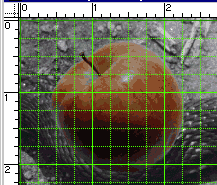
ants will not be shown. If you choose Show Rulers you will see rulers across the
top and left sides of your image. To change the ruler origin, drag
on the little square in the top left corner. The Snap command, in the View menu is the one I find most
annoying. When turned on, as it is by default, selection outlines,
including crop outlines will snap to the grid, and to edges, including
the image edge. This makes it almost impossible to shave off small
amounts when cropping. I keep this turned off (unchecked) almost
all the time.
|
|
| |
|