
|
|
2.2 IN-CAMERA STORAGE MEDIA | ||
 Learn
To Draw Learn
To Draw |
 Learn
To Paint Learn
To Paint |
Photoshop
Elements |
Animation
Menu |
Art
Principles |
Art
Appreciation |
When you take photographs, they have to be temporarily stored in the camera; usually on flash memory cards or spinning magnetic disks. Both types of storage devices share a number of features that include the following:
- They are erasable and reusable
- They are usually removable, so you can remove one and plug in another. This way, memory is limited only by the number of devices you have
- They can be removed from the camera and plugged into the computer to transfer the images. There are also printers with slots for these devices so you can make prints without a computer.
Because high quality digital image files are so large, it takes a lot of storage space to save them. For this reason, most cameras give you two options:
- You can remove one storage device, and replace it with another. This is like replacing a finished roll of film with a new fresh one.
- Most cameras allow you to choose between two or three modes of compression or image size. Using high compression or small images creates smaller image files so more fit onto a storage device. The tradeoff is that the images will not be as good as ones you might take at a lower compression or larger size.
The number of images you can store on any given device depends on a number of factors. These include the compression scheme used by the camera and the complexity of the scene. More complex scenes compress less than ones with fewer details. The number you can store is important because once you reach the limit you have no choice but to quit taking pictures or erase some of the ones you have already taken to make room for new ones. How much memory you need depends partly on what you use the camera for. If you’re used to shooting 5 or 6 rolls of standard film on vacation, your camera better be able to store the same number of images or you’ll be out of luck.
Let's take a look at some of the leading forms of storage in digital cameras, starting with the most common form—flash memory.
As the popularity of handheld devices such as digital cameras, voice recorders, cellular phones, and computers has increased, so has the need for small, inexpensive memory devices. The type that's caught on is called flash memory.
 |
Flash memory comes in a variety of shapes and sizes. Courtesy of SanDisk |
Flash memory uses solid state chips to store your image files. In some ways, these chips are like the memory chips (RAM) inside your computer, but they have one important difference. They require no batteries and don't loose your data when the power is turned off. Your files are retained indefinitely without any power to the Flash components. These chips are packaged inside a case with connectors and the entire unit is called a card.
 |
If you take the cover off a flash memory card, you find solid state circuits. Courtesy of SanDisk. |
Flash memory cards can be plugged into a camera, or into a card slot built into the computer or attached to it by a cable. These cards consume little power, take up little space, and are very rugged. They are also very convenient; you can carry lot's of them with you and change them as needed (assuming you can afford lots of them).
 |
| Flash cards can be plugged into laptops, cameras, and desktop computers. Image courtesy of SanDisk. |
There is an old set up line for a joke that begins "I have good news and bad news." The good news is that we have these flash memory cards at all. The bad news is that they come in a variety of formats that are not interchangeable. As a result of the competition, cameras support a confusing variety of incompatible flash memory cards, each type supported by its own group of companies. Once you have a sizable investment in memory cards, you are locked into using only those cameras that support your format.
Until recently, most flash cards have been in the standard PC Card (PCMCIA) format that is widely used with notebook computers. However, with the growth of the digital camera and other markets, smaller formats have been introduced.
CompactFlash (CF) was developed by SanDisk Corp in 1994 and uses the popular ATA architecture that emulates a hard disk drive. These matchbook-sized cards come in two forms. The newer CF Type II cards (CF/2) are used for higher capacity flash cards and magnetic disk drives such as IBM's Microdrive. These 5mm cards are thicker than the original 3.3mm CF Type I cards. Due to the different thicknesses, Type I cards will work in Type II slots, but not visa versa. To use CF/2 cards, your camera must have a CF/2 slot. This very popular storage media is supported by the Compact Flash Association.
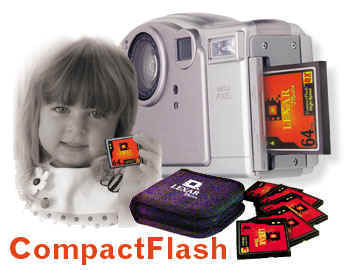 |
CompactFlash cards are one of the most popular storage media in digital photography. Image courtesy of Lexar Media. |
 |
CompactFlash™ type II cards on the market. New thicker card will be standard in next generation of digital cameras because of the much higher storage capacities. Courtesy of Delkin Devices. |
SmartMedia is the thinnest storage medium available, about one half the area of a credit card and shaped like a small floppy disk (45mm x 37mm x 0.76mm). Based on an ATA architecture, it's shaped so that it can only be inserted into the camera's memory slot the correct way. The major advantage of SmartMedia is its simplicity; it is nothing more than a flash chip on a card. It contains no controllers and no supporting circuitry, which reduces the size of the card as well as manufacturing costs. The problem with this approach is that the necessary controller functions must reside in the camera and therefore you may not be able to use newer cards in older cameras. A lot of the first cameras using this storage medium had to be returned to their manufacturers for upgrades when the next generation of higher-capacity cards was released. This format is supported by a group of companies organized into the Solid State Floppy Disk Card Forum.
 |
SmartMedia is smaller than CompactFlash and to-date has trailed in storage capacity. Courtesy of Lexar Media. |
When notebook computers became popular, they didn’t have room for large storage devices so small plug-in cards were developed. Initially called PCMCIA cards (after the unforgettable Personal Computer Memory Card International Association), this name was later changed to the more pronounceable PC Cards. (However, not everyone has switched to the new name so the cards are now called by two names.)
About the size of a thick credit card, PC Cards come in a variety of formats, but it's the Type I and Type II Cards that are used for flash memory. All PC cards have the same length and width (85.6 mm x 54.0 mm or 3.3" x 2.13"), but vary in thicknesses. Type I is 3.3 mm thick, Type II is 5.0 mm, and Type III is 10.5 mm. Slots for thicker cards can accept one or more of the thinner cards. For example, a Type IV slot holds one Type II card and one Type III, or two Type II cards.
 |
Because PC Cards are larger than some other storage devices, they generally hold more data.. Courtesy of Lexar Media. |
Sony Corporation has developed a new form of flash memory called a Memory Stick™, and shaped something like a stick of gum. Designed for use in a variety of devices, MemorySticks are also used in Sony digital cameras. The first versions have capacities of up to 32 Mbytes using currently available flash chips, but capacity will be increased as denser chips become available. One feature the MemoryStick has that other flash memory devices don't is an erasure prevention switch that eliminates the risk that you'll accidentally erase or write new photos over your existing images.
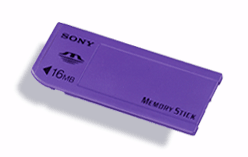 |
Sony's new Memory Stick™ cards are a new approach
to flash memory storage. Courtesy of Sony.
|
Instead of flash memory, some cameras are designed to use rotating magnetic media, much like the floppy and hard drives in your desktop system.
One of the oldest and cheapest storage mediums still in use is the 3½-inch floppy disk drive. You'd be hard pressed to find a system that can't read these disks. There is at least one digital camera that has chosen this medium as in-camera storage. Doing so increases the size of the camera a little, but the cost savings and ready access to drives that can open and use the image files often compensate for this one shortcoming. Almost all other types of storage require special hardware or software on the computer before you can transfer files to it. It's the universal usability of floppy disks that makes them so attractive.
 |
Sony's Digital Mavica has been a smashing success because of the convenience it brings you. The images are stored on floppy disks that can be read on almost any computer. Courtesy of Sony. |
Over 5 billion 3.5-inch 1.44 MB computer diskettes have been sold since their introduction in 1984. During that same period, hard disk capacities of new PCs have increased from 20 MB to 20 GB or more. With such large drives, the old floppy’s usefulness is very limited. There is a race on to replace the venerable floppy with newer high capacity floppy disks. There are three leading contenders in the race, the 100 megabyte Iomega Zip disk, the 120 megabyte SuperDisk, and the 200 megabyte Sony HiFD. The three kinds of disks are not interchangeable so their will be confusion in the market for a while. Files stored on one disk can’t be open by the other drive. However, both SuperDisk and HiFD drives are backwards compatible and can read, write, and format traditional 1.44MB floppy disks.
 |
Panasonic was the first to introduce a digital camera (the PV-SD4090) that saves images onto a high-capacity floppy disk; in this case the 120MB SuperDisk disk. To read the disks, you'll need a SuperDisk drive in your computer. Courtesy of Addonics. |
PC Cards in the Type III and Type IV versions are physically large enough to contain rotating hard disks that can hold an amazing number of digital images.
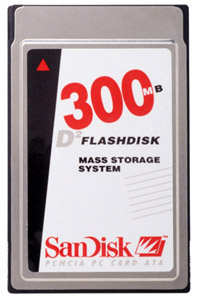 |
Sandisk's 300 Megabyte Type III card is a very small hard disk in a PC Card format. Image courtesy of SanDisk. |
Iomega's Clik! drive uses a 40 megabyte 2-inch square disk. One battery operated version of the Clik! drive is designed to provide additional storage in the field. When the flash card in your camera is full, you can download the images to a Clik! mobile drive and return to shooting. Back at your home or office, just place the Clik! drive into its docking station and download the pictures to the computer. The 40 megabyte Clik! disks are a lot cheaper than flash memory so you can shoot for days without having to buy expensive flash memory cards.
 |
Iomega Click
Disks (left) and drive (below) let you download images in the field
and keep on shooting. Courtesy of Iomega.

|
A small 2-inch Clik! disk slides into the slot at one end and a flash card adapter, called the Flash Memory Reader" fits in the other. This adapter has slots for both CompactFlash and SmartMedia cards. When you have all of the parts together, all you do is press a button and the image files are automatically transferred from the flash card to the Click! disk. A small LCD display on the reader has icons for the drive and memory card and reader and a digital gauge to let you know the percentage of the Clik! that is already full.
One of the current drawbacks of compact flash memory cards is limited storage capacity. For high resolution cameras this is a real drawback. One solution is high speed, high capacity hard disk drives. Until recently, these drives were too big to be mounted inside cameras, but now that has changed. The dimensions of IBM's microdrive are the same as the CompactFlash Type 2 cards and can be used in any camera having a CompactFlash Type 2 slot.
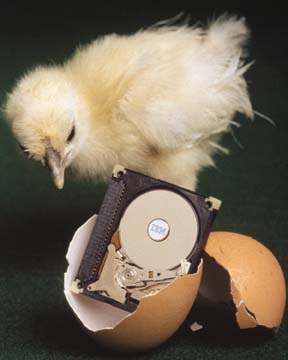 |
IBM has introduced 340 MB and 170 MB microdrives for use in digital cameras. Courtesy of IBM. |
