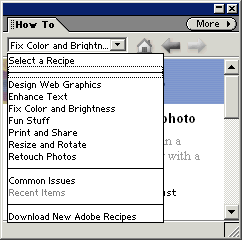
The How To palette (formerly known as the Recipes palette,
which is what it still contains) offers a “cookbook” of
mini tutorials for many popular tasks. Elements 1 came with
thirty one recipes (if I’ve counted right), and more were
supposed to be available as time goes by from Adobe Online.
I downloaded seven new recipes the first time I accessed
Adobe Online. However, the download process was so nutty,
I never downloaded any more.
Elements 2 comes with 48 recipes and they are a better
bunch than the previous ones. I hope Adobe Online is better
behaved this time.
The recipes can be passive or active, i.e. there are buttons
included in the recipe that will perform the described recipe
step for you, if clicked. Otherwise, you can do the work
yourself, following the written descriptions.
Recipes are excellent learning tools for beginners. I would
highly recommend trying out all the recipes as a way of
familiarizing yourself with many of Elements features.
If you use Adobe Online to download updates, you then need
to close and reopen Elements to load your new recipes.
Please note that palettes which are in the palette well
will not stay open while you edit. To bring a palette out
of the well, click on its name tab and drag it out.
|
 BreBru.com