The data which appears in the Info palette depends on the
tool you are using. When the eyedropper has been selected,
the Info palette will show a constantly updated list of
the color ingredients of whatever is directly below the
pointer.
If the marquee tool is in use, it will show the coordinates
of the start point, and width and height of the selection
as it is dragged.
If the crop tool, or zoom tool is in use, it will show the
width and height of the dragged selection as well as the
angle of rotation, if transformed.
When the gradient tool is being used, it will provide location,
distance, and angle data.
When any two-dimensional transformation is made, it gives
updated height, width, angle, and skew information.
If any color adjustment dialog boxes are used, the Info
palette shows before and after color values beneath the
cursor.
Location and distance data includes x and y
coordinates of starting points, change in x, change in y,
width, and height, and angle. All information is instantly
updated as the cursor is moved across the image.
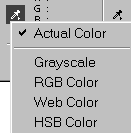
Color information is available in four modes. There are
six measurement unit options.
BUG - if you have an image open on top
of the (open) File Browser, the color numbers in the Info
palette will only display for about half a second once you
stop moving your cursor over the picture. This behavior
will persist even if you then minimize the File Browser.
Closing the File Browser seems to correct the problem.
Please note that palettes which are in the palette well
will not stay open while you edit. You also cannot access
the palette menu when a palette is in the well. To bring
a palette out of the well, click on its name tab and drag
it out. |
 BreBru.com